
How to Download Instagram Videos on iPhone
You can save Instagram videos to your iPhone without any app. Safari on iOS 13 and newer has a built-in download manager, so SnapInsta can send the video straight to your phone. Here's how to do it and how to move the video into your Photos.
What You Need
- An iPhone or iPad with iOS 13 or newer (Settings > General > About shows your version).
- The Safari browser. Other browsers on iPhone can't always save files.
- The link to a public Instagram post or Reel.
Step 1: Copy the Instagram Link
Open Instagram, go to the video or Reel and tap the paper plane icon. Tap Copy link. If you don't see it, tap the three dots and look for Link or Copy link.
Step 2: Paste It Into SnapInsta in Safari
Open Safari and go to SnapInsta. Tap the box at the top, tap Paste, then tap Download.
Step 3: Download the Video
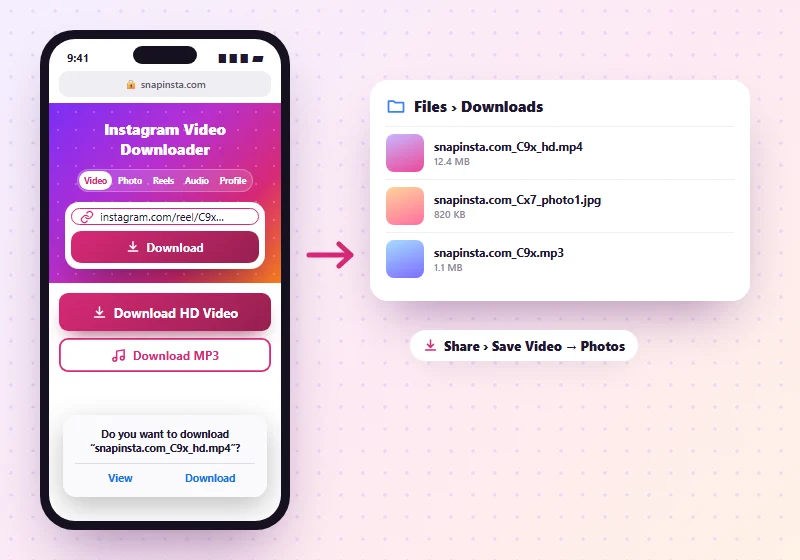
When the preview appears, tap Download HD Video or Download Video. Safari asks "Do you want to download…?". Tap Download. A blue arrow appears next to the address bar while the file saves.
Step 4: Move the Video to Photos
- Open the Files app and tap Downloads (under On My iPhone or iCloud Drive).
- Tap the video to open it.
- Tap the Share icon, then Save Video. It now appears in your Photos app.
For photos, the steps are the same, but the button says Save Image. A ZIP of several photos opens into a folder when you tap it in Files.
Change Where Safari Saves Files
Go to Settings > Safari > Downloads to choose On My iPhone or iCloud Drive. Saving on your iPhone is faster and works without internet later.
Problems on iPhone
Nothing happens when I tap Download
Make sure you're using Safari and that iOS is up to date. Content blockers can also stop downloads, so try turning them off for this site.
The video opens in a player instead
Tap the Share icon in the player and choose Save to Files, or go back and long-press the button, then tap Download Linked File.
My iPhone is on iOS 12 or older
Safari can't save files on these versions. Use a file manager app with a built-in browser, open SnapInsta inside it and download from there.
Using an Android phone or a computer instead? See the Android guide or the PC guide.
Frequently Asked Questions
Can I save Instagram videos directly to my camera roll?
Safari saves them to the Files app first. From there, tap Share and Save Video to put them in Photos.
Does this work on iPad?
Yes. The steps are the same on iPadOS 13 and newer.
Can I download Instagram Reels on iPhone?
Yes. Use the Reels downloader the same way.