
Instagram Profile Picture Downloader
- Full Size DP
- By Username
- No Login
Works on iPhone · Android · Windows · Mac
How to Download an Instagram Profile Picture
- Copy the username, or open the profile in Instagram, tap the three dots at the top and choose Copy profile URL.
- Paste it into the box above and tap Download. You can type the name with or without the @.
- The full-size profile picture appears. Tap Download Profile Picture to save it as a JPG.
On Instagram, profile pictures show up as tiny circles you can't open or zoom. SnapInsta's Instagram profile picture downloader shows the full-size DP and lets you save it. Type a public username or paste a profile link above, and you'll see the picture in its largest size.
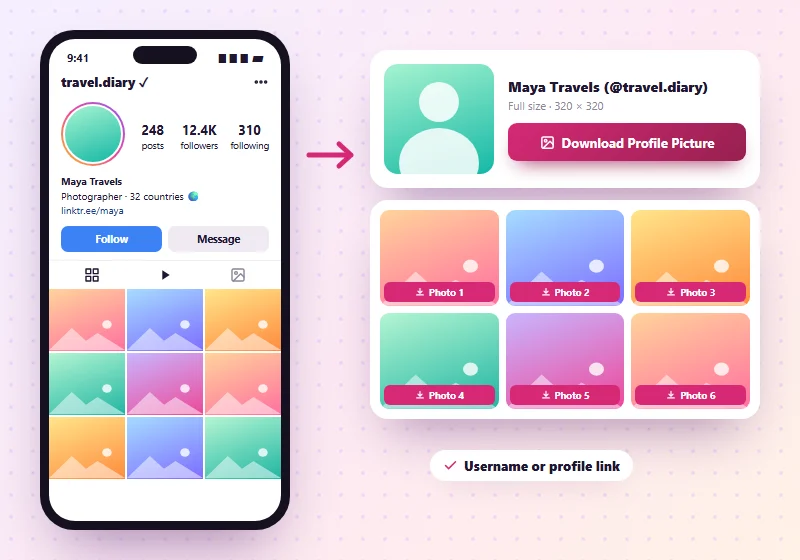
Download Posts From a Public Profile
After you enter a public profile, SnapInsta also shows that profile's recent public posts, up to 12 of them, along with the bio. Each post has its own download button, just like on our Photo Downloader and Instagram video downloader.
How Big Is an Instagram Profile Picture?
Instagram shows profile pictures as a small circle, but it keeps a larger copy, usually 320 × 320 pixels and sometimes bigger. SnapInsta saves the largest copy Instagram has. The picture is square; the circle is only how the app displays it. Older accounts may have uploaded a smaller picture, which can't be made sharper.
What You Can Type in the Box
| You enter | Example | Works |
|---|---|---|
| Username | natgeo | Yes |
| Username with @ | @natgeo | Yes |
| Profile link | instagram.com/natgeo/ | Yes |
| Shared profile link | instagram.com/natgeo?igsh=… | Yes |
| A private account | – | No, private profiles stay private |
Profile Picture Sizes
| Where you see it | Size |
|---|---|
| Instagram app (circle) | About 110 × 110 pixels on screen |
| Instagram on a computer | About 150 × 150 pixels |
| SnapInsta download | The largest copy Instagram keeps, usually 320 × 320 or more |
Save a Profile Picture on Phone or PC
On iPhone
Type the username in the box in Safari and tap Download Profile Picture. The JPG goes to Files > Downloads. Open it, tap Share and Save Image to add it to Photos.
On Android
In Chrome, enter the username and tap Download Profile Picture. The picture shows up in your Gallery and in Files > Downloads.
On Windows and Mac
Enter the username or paste the profile URL and click Download Profile Picture. The file saves to your Downloads folder, and you can open it there to zoom in.
Why Use a Profile Picture Downloader?
- See a profile picture clearly before you follow or message someone.
- Check if an account is real. A clear picture helps you spot fake or copycat accounts.
- Save your own DP in full size if you've lost the original.
- Find the right account when several people share a similar name.
What You Need to Know
- Only public profiles work. Private profiles are not supported.
- Pictures are saved in the size Instagram stores them.
- A profile picture belongs to its owner. Don't reuse someone's photo as your own, and never use it to pretend to be them.
Profile Downloader Not Working?
- "Not available": check the spelling of the username, or the account may be private or deleted.
- "Busy right now": Instagram limits how often profiles can be looked up. Wait a minute and try again.
More Instagram Tools
Instagram Profile Picture Downloader FAQs
Can I see an Instagram profile picture in full size?
Yes. Enter the public username, and SnapInsta shows the largest size Instagram has.
Does the person know I viewed or saved their profile picture?
No. SnapInsta doesn't notify anyone, and we don't log in to Instagram.
Do I need the full link, or just the username?
Either works. Type the username, with or without the @, or paste the profile link.
Can I download a private account's profile picture?
No. SnapInsta only works with public profiles.
Why is the profile picture blurry?
The owner probably uploaded a small image. SnapInsta can't make it bigger than Instagram's stored version.
Is the Insta DP downloader free?
Yes. It's free and works on any phone or computer.
Does Instagram notify someone if I screenshot their profile picture?
No. Instagram doesn't send any notice for screenshots of profiles or profile pictures.
Can I download my own profile picture?
Yes. Enter your own username and save it in full size, handy if you've lost the original file.
Can I download Story Highlight covers?
No. Highlights are only shown to logged-in users, so SnapInsta doesn't offer them.