
Instagram Reels Downloader
- HD Reels
- With Sound
- MP3 Audio
Works on iPhone · Android · Windows · Mac
How to Download Instagram Reels
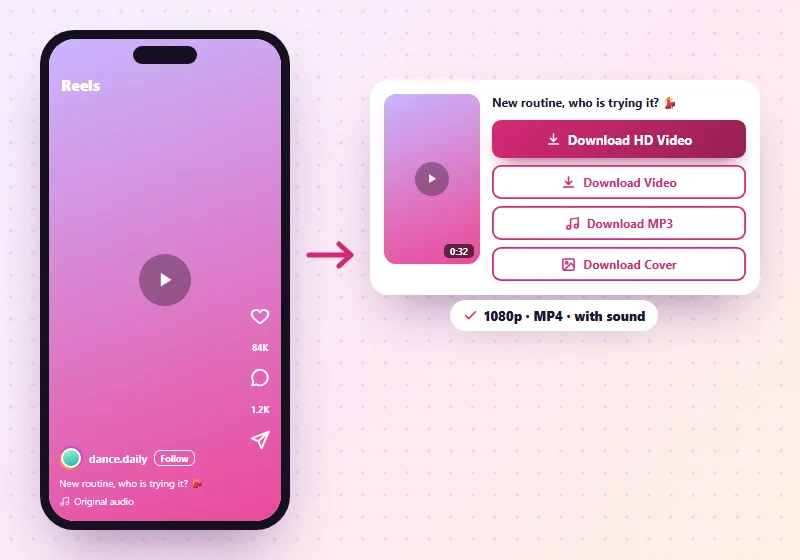
- Open the Reel in Instagram. Tap the paper plane icon on the right side.
- Tap Copy link.
- Paste the link in the box above and tap Download.
- Tap Download HD Video or Download Video under the preview. Tap Download MP3 for just the sound.
Reels are the most-watched videos on Instagram, and the ones people most want to keep. SnapInsta's Instagram Reels downloader saves any public Reel as an HD MP4 with its sound, or just the audio as an MP3. Paste the Reel link above and tap Download.
SnapInsta vs Instagram's Own Download Button
Instagram now lets you download some public Reels from the share menu, but only when the creator allows it. Here's how that compares:
| Item | Instagram's button | SnapInsta |
|---|---|---|
| Works on every public Reel | Only if the creator allows it | Yes, for public Reels |
| Instagram logo on the video | Yes | No |
| Save only the audio | No | Yes, as MP3 |
| Works on PC | No | Yes |
| Needs Instagram app | Yes | No |
Reels Quality and Sound
Instagram stores Reels in up to 1080p. When there's an HD version, you get a Download HD Video button for it, and the video keeps its original sound. If Instagram removed a song for copyright reasons, the Reel was already silent on Instagram, and the download will be silent too.
| Reel detail | What you get |
|---|---|
| Format | MP4 (H.264 video, AAC sound) |
| Shape | Vertical 9:16, as posted |
| Resolution | The best Instagram stores, up to 1080 × 1920 |
| Length | The whole Reel, up to 3 minutes |
| Watermark | None added |
You may see other sites promise 4K Reels. Instagram doesn't store Reels above 1080p, so any "4K" file is just the same video made bigger, with no extra detail.
Want the song or voiceover on its own? Our Instagram audio downloader turns any Reel into an MP3.
Save Reels on Any Device
Android: Paste the link in Chrome and tap Download. The Reel saves to Downloads and your Gallery. See the Android guide if you can't find it.
iPhone: Use Safari. The Reel saves to the Files app. Open it and tap Share > Save Video to move it to Photos.
PC or Mac: Open the Reel on instagram.com, copy the link from the address bar and paste it here. The file goes into Downloads.
Who Downloads Instagram Reels?
- Creators who back up their own Reels or post them on other platforms.
- Editors who need a clean clip to trim, caption or add to a longer video.
- Learners saving tutorials, workouts and recipes to watch offline.
- Fans keeping a favourite clip, for personal use.
Is It Legal to Download Instagram Reels?
Saving a public Reel for yourself, to watch offline or keep as a reference, is generally fine. What matters is what you do next. Reposting someone else's Reel, using it in ads or earning money from it needs the creator's permission, and music in Reels usually belongs to the artist. Your own Reels are yours to download and reuse anywhere.
Why a Reel Won't Download
- The account is private. Only public Reels can be saved.
- The Reel was deleted or archived. If it's gone from Instagram, it can't be downloaded.
- The link is from a Story. Open the Reel itself and copy its own link.
- Instagram is busy. Wait a moment and press Download again.
Tips for Downloading Reels
- Use Wi-Fi for long Reels in HD.
- Download your own Reels to keep a backup or post them elsewhere.
- Check the sound. If a song was removed by Instagram, the downloaded Reel will be silent too.
- Credit the creator if you share a Reel with their permission.
Looking for other videos? Feed videos, carousel videos and IGTV work on our Instagram video downloader.
More Instagram Tools
Instagram Reels Downloader FAQs
Can I download Instagram Reels with music?
Yes. Reels are saved with their audio, unless Instagram has removed the music for copyright reasons.
Do downloaded Reels have a watermark?
No. SnapInsta doesn't add a watermark or Instagram logo.
Can I download Reels on iPhone?
Yes. Use Safari on iOS 13 or newer, and the Reel saves to the Files app.
Can I save just the audio from a Reel?
Yes. Tap Download MP3 under the preview to save just the sound.
What quality are downloaded Reels?
The best Instagram has, up to 1080p HD, as MP4 with sound.
Can I download Instagram Reels in 4K?
No site can. Instagram stores Reels at up to 1080p, so that's the sharpest version that exists.
Do I need an app to download Reels?
No. SnapInsta works in your browser on iPhone, Android and PC.
Is it legal to download Instagram Reels?
Saving public Reels for personal use is generally fine. Ask the creator before you repost or use a Reel.
Can I download Reels from private accounts?
No. Only public Reels can be downloaded.
Is the Reels downloader free?
Yes. It's free, with no limit on how many public Reels you save.